Multi-Field Nested Parser
The Multi-Field Nested Parser component extracts multiple user-selected fields or nested paths from JSON, tables, or Data Frames and generates an individual output for each extracted field. These outputs can be connected directly to downstream workflow components or used for Data Frame and SQL operations.
Purpose
The Multi-Field Nested Parser component extracts multiple specific fields or nested values from structured data and makes each extracted value available as a separate output for further processing in the workflow.
Parameters
| Parameter | Description |
|---|---|
| Data Input | Connect the Data input node to the source data. The input can be a JSON object, table, or DataFrame. |
| Fields to Extract (Comma Separated) |
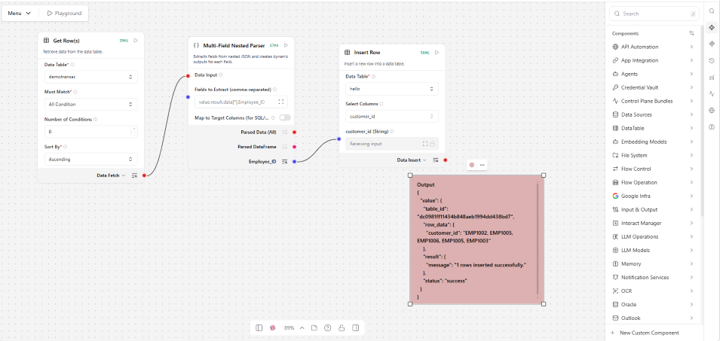
Specifies the fields or nested paths to extract from the input data. For a table or DataFrame – Enter the column names directly. For JSON – Specify the field path based on the JSON structure and indexes. Example: value.result.data[0].email
|
| Map to Target Columns (for SQL) |
Enables mapping of extracted fields to specific target columns for downstream SQL operations. When enabled, an Insert SQL output is generated with the corresponding SQL INSERT query, which can be connected to downstream components such as Insert Row. |
| Target Columns (Comma Separated) |
Specifies the target column names corresponding to the extracted fields. Use this option to assign different names to the extracted fields before passing them to a downstream component. Example: If Place is the extracted field and you want to map it as city, enter city as the target column name. |
| Table ID | Specifies the ID of the target table where the extracted values are inserted. You can retrieve the table ID from the Data Fetch output of the Get Row component. |
| Timeout (Seconds) | Specifies the maximum time, in seconds, that the component waits for the operation to complete before timing out. Default: 30 seconds. |
| Retry Count | Specifies the number of times the component retries the operation when an execution attempt fails. Default: 1. |
| Delay Between Retries (Seconds) | Specifies the time, in seconds, to wait between consecutive retry attempts. Default: 1 second. |
| Delay Before Execution (Seconds) | Specifies the time, in seconds, to wait before the component starts processing the input. Default: 0 seconds. |
| Delay After Execution (Seconds) | Specifies the time, in seconds, to wait after the component completes processing. Default: 0 seconds. |
| Continue on Error |
Determines how the workflow behaves when an unrecoverable error occurs. Stop Workflow – Stops workflow execution. Continue – Skips the current step and continues workflow execution. Continue Using Error Output – Continues execution and routes the error details through the error output handle. |
Outputs
| Output | Description |
|---|---|
| Parsed Data (All) | Returns all extracted fields and their corresponding values. |
| Parsed DataFrame | Returns the extracted fields and values as a DataFrame for downstream processing. |
| Insert SQL |
Appears when Map to Target Columns (for SQL) is enabled. Returns the generated SQL INSERT query based on the extracted fields and mapped target columns. This output can be connected directly to downstream components such as Insert Row to insert the extracted data into the target table. |
| Individual Extracted Fields |
Creates a separate output for each field specified in Fields to Extract. The output uses the extracted field name and can be connected directly to the corresponding downstream component. When Target Columns are configured, the output uses the specified target column name. |
Note: Each extracted field is created as an individual output. The output uses the extracted field name, or the Target Column name when mapping is enabled. You can connect these output nodes directly to the corresponding downstream components for further processing.
Tips
1. When extracting fields from JSON data received from a previous component, use the appropriate JSON path based on whether you want to extract a single value or multiple values.
a. To extract multiple values: Use [*] to retrieve the specified field from all objects in the array.
Example: To extract all employee IDs:
value.result.data[*].Employee_ID
b. To extract a single value: Specify the index of the required object.
Example: To extract the employee ID from the first object:
value.result.data[0].Employee_ID