Chat Output
The Chat Output component ingests Message, Data, or DataFrame types from upstream components, converts them into a standardized Message format if needed, and emits the final result as a chat message.
Behavior Across Environments
In the Playground: Output is streamlined to focus on chat-relevant elements, including text responses, sender names, and file attachments. Associated metadata can be inspected via the Playground message logs.
Via the API: API responses return the full Chat Output Message object alongside complete execution run data. Because API payloads can be verbose, applications should include extraction logic to parse only the relevant fields needed for display to end users.
Chat Output Parameters
Tip: Most input parameters are hidden by default in the visual editor to maintain a clean workspace. You can expose them using Controls in the component’s header menu.
For detailed information on the resulting payload attributes and parameters mapped directly to Message properties, see Message Data.
Chat Output Parameters
| Parameter | Description |
|---|---|
| Inputs* | The input port that accepts Message, Data, or DataFrame objects from upstream components to display as a chat message. (Required) |
| Sender Name |
Specifies the display name associated with the outgoing chat message (for example, AI).
|
| Session ID | The unique identifier used to associate the output message with a specific chat session or conversation thread. |
| Context ID | Optional identifier used to associate the message with a specific context or background state. |
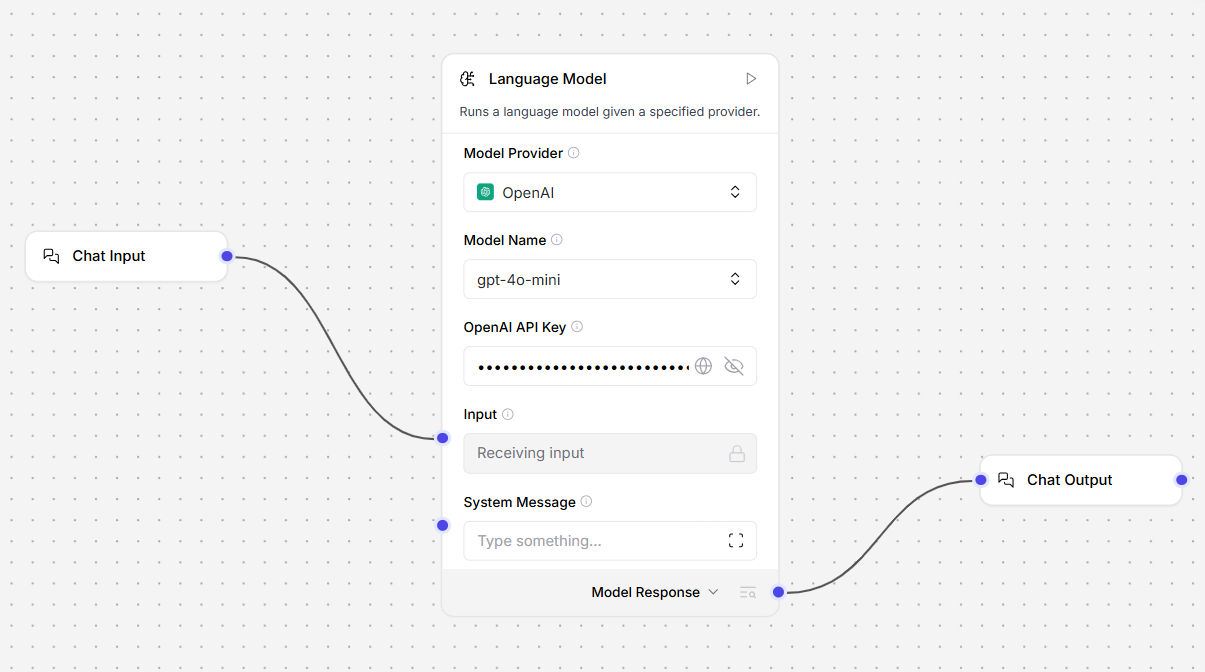
Using Chat Input and Output Components in a Flow
Example: Simple LLM Chat Flow
Input port.Language Model: Processes the incoming input using the configured provider (e.g.,
OpenAI, gpt-4o-mini) and generates a response.Chat Output: Receives the generated text from the Model Response port and formats it as a chat response for the user.
Practical Examples & Resources
Sending Chat Input via the Robility Flow API
Example Request
curl --request POST \
  --url "http://$ROBILITYFLOW_SERVER_ADDRESS/api/v1/run/$FLOW_ID" \
  --header "Content-Type: application/json" \
  --header "x-api-key: $ROBILITYFLOW_API_KEY" \
  --data '{
  "input_value": "What's the recommended way to install Docker on Mac M1?",
  "output_type": "chat",
  "input_type": "chat"
}'
Request Parameters
input_value: The primary message or prompt string sent to the Chat Input component.input_type & output_type: Defines the mode as "chat" for both request and response handling.session_id (Optional): If omitted, the flow automatically uses its default session ID. To manage distinct user conversations, include a custom session_id in your JSON request body.