Robility Flow Assistant
Robility Flow Assistant is an AI-powered assistant available directly within the canvas that simplifies workflow creation through natural language interactions.
The assistant understands the structure and context of the currently active flow, enabling it to:
a. Recommend appropriate components.
b. Generate workflow elements.
c. Answer platform-related questions.
d. Guide users during workflow design.
Each request sent to Robility Flow Assistant is processed through a dedicated server-side workflow that runs independently of the flow currently open in the canvas. This separate execution model ensures reliable processing, consistent responses, and uses its own language model to provide assistance.
Limitation: Robility Flow Assistant supports a maximum input length of 780 characters per request.
Create a Custom Component with Robility Flow Assistant
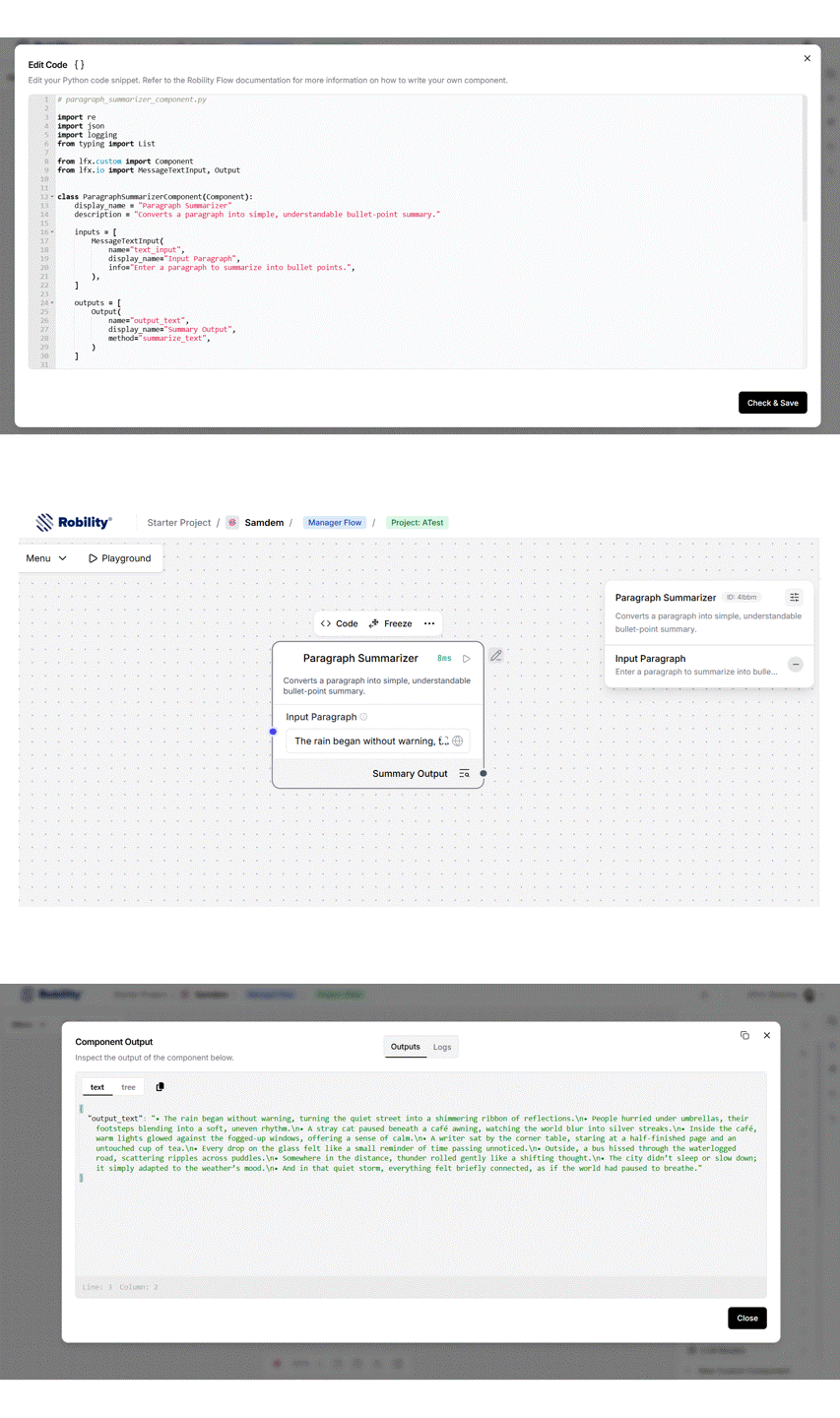
This example demonstrates how to use Robility Flow Assistant to generate a custom component that transforms a paragraph into a simple bullet-point summary.
Step 1: Enter a Prompt
Provide a prompt describing the custom component you want to generate.
Example Prompt:
Create a custom component named Paragraph Summarizer that accepts a paragraph as input and returns a message-style output. The component should split the paragraph into individual sentences and convert each sentence into a bullet point. Ensure proper whitespace and formatting cleanup, gracefully handle empty or invalid inputs, use typed methods, and include appropriate error handling for robustness.
Step 2: Generate the Component
Robility Flow Assistant generates the component code based on your prompt.
Note: Since the code is AI-generated, the output may vary and may not exactly match the example shown in this documentation.
import re
import logging
from typing import List

from lfx.custom import Component
from lfx.io import MessageTextInput, MessageTextOutput


class ParagraphSummarizer(Component):
    """
    Converts a paragraph into a simple bullet-point summary.
    """

    display_name = "Paragraph Summarizer"
    description = "Splits a paragraph into sentences and returns a bullet-point summary."

    inputs = [
        MessageTextInput(
            name="text_input",
            display_name="Text Input",
            info="Enter a paragraph to summarize.",
        ),
    ]

    outputs = [
        MessageTextOutput(
            name="output_text",
            display_name="Summary Output",
            method="summarize_text",
        )
    ]

    def summarize_text(self) -> str:
        try:
            text = self.text_input

            if not isinstance(text, str) or not text.strip():
                return "Please provide a valid paragraph."

            sentences = self._split_sentences(text)
            bullets = self._format_bullets(sentences)

            return "\n".join(bullets)

        except Exception as e:
            logging.error(f"Error in ParagraphSummarizer: {str(e)}")
            return "Error while generating summary."

    def _split_sentences(self, text: str) -> List[str]:
       olor:#b294bb;">return [
            s.strip()
            for s in re.split(r"(?<=[.!?]) +", text)
            if s.strip()
        ]

    def _format_bullets(self, sentences: List[str]) -> List[str]:
        return [f"• {sentence}"for sentence in sentences]
Step 3: Save the Component
a. Copy the generated code into the Custom Component Code editor.
b. Click Check & Save.
c. After successful validation, the component becomes available in the canvas and can be reused like any other custom component.